
Last updated: May 24, 2026
Quick Answer: The control panel in the camper is the central control center for all living area functions, from battery and tank monitoring to lighting and heating. Knowing the symbols and displays makes traveling more relaxed, avoids expensive mistakes, and allows you to maintain an overview of your vehicle's condition at all times.
Key Takeaways
- The Control panel (also called Control Panel) displays battery charge, tank levels, warning lights and consumer data.
- Green symbols usually mean "everything is OK" yellow warn of low fill levels, red signal an urgent need for action.
- The Battery indicator distinguishes between starter and auxiliary batteries, which is often confusing for beginners.
- On-board computer and control panel are not the sameThe on-board computer controls vehicle data, the control panel the living area functions.
- Many simple errors, such as an empty fresh water tank or an overloaded fuse, can be Fix directly on the panel itself.
- Panel operation varies depending on the manufacturer (Truma, CBE, Schaudt, etc.), but the basic logic remains the same.
- A Replacement control panel costs between €150 and over €800, depending on the model and manufacturer.
- Professionals especially appreciate Real-time voltage displays and configurable thresholds for warnings.
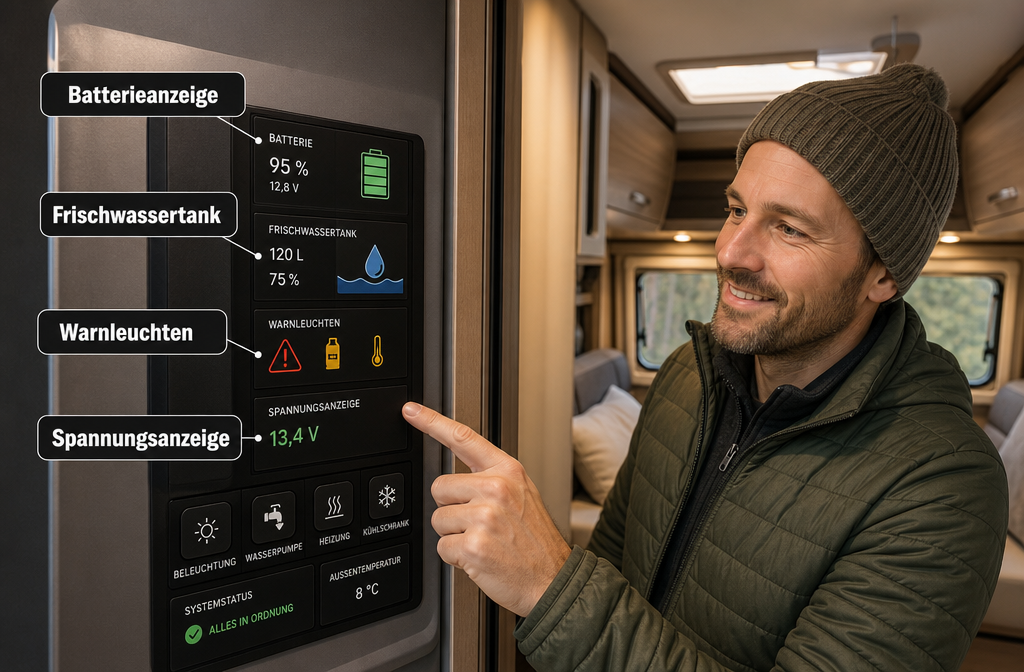
What does the main display show in the RV?
The main display of a motorhome control panel shows all the important status information of the living area at a glance: battery charge (leisure and starter battery), fill levels of the fresh and waste water tanks, as well as active consumers such as pump, lighting or heating.
Depending on the manufacturer and model, the following displays may also appear:
- Gas supply (for vehicles with gas supply)
- Solar feed-in in watts (when equipped with a solar panel)
- Mains voltage (230 V shore power active or not)
- Outside and inside temperature
- Heating System Status (e.g. Truma Combi)
💡 Note: The main display is not a diagnostic tool, but a status monitor. It shows what is happening, not why something is happening.
Typical ad structure at a glance:
| Advertisement | Unity | Meaning |
|---|---|---|
| Leisure battery | Volt / % | Living area battery charge level |
| Starter battery | Volt | Vehicle battery condition |
| Fresh water | % / bar | Tank level |
| Wastewater | % / bar | Gray water tank level |
| Shore power | Symbol | 230 V connected yes/no |
Which symbols on the control panel are important for beginners?
For beginners, the symbols that indicate critical conditions are particularly important. Knowing these will help you avoid the most common mishaps on your first camping trip.
The most important symbols for beginners:
- 🔋 Battery symbol with exclamation mark: Leisure battery at critical charge level (often below 11.8 V for lead-acid)
- 💧 Faucet symbol with cross. Fresh water pump active, but tank empty or pump blocked
- 🌡️ Thermometer symbol: Heating active or temperature sensor alarm
- ⚡ Lightning bolt symbol: Power supply interrupted or fuse tripped.
- 🟥 Red bar symbol for wastewater: Tank full, empty immediately
Rule of thumb for beginners: Green = drive, Yellow = observe, Red = act. This traffic light logic applies to almost all common panel systems.
How does the battery indicator in the camper work?
The battery indicator in the camper shows the charge status of the auxiliary battery (for the living area) and often also the starter battery (for the engine) separately. Both batteries have different tasks and should never be confused.
Leisure battery vs. starter battery:
| Property | Leisure battery | Starter battery |
|---|---|---|
| Task | Electricity for living space | Start engine |
| Typical capacity | 80–200 Ah | 60–100 Ah |
| Deep discharge allowed? | Yes (for AGM/LiFePO4) | No |
| Advertisement in the panel | Volt + % | Volt |
The voltage display is more informative than a percentage value because the percentage value is calculated differently depending on the battery type (lead-acid, AGM, lithium):
- 12.7 V and more = fully charged (Lead/AGM)
- 12.4 V = approximately 75% charged
- 12.0 V = approx. 50% charged, charging recommended
- 11.8 V and below = critical, charge immediately
At LiFePO4 lithium batteries other values apply (typically 13.2 V full, 12.0 V empty). Anyone curious about an electric camper van will find it at eVentje, the electric camper van from Campcruisers, interesting insights into modern energy systems.
What do the different warning lights in the RV mean?
Warning lights on the control panel signal conditions that require immediate or timely attention. A red warning light does not automatically mean a disaster, but it should never be ignored.
The most common warning lights and their meaning:
- Red battery warning: Leisure battery below minimum voltage (below 11.8 V for lead-acid). Switch off consumers, charge immediately.
- Yellow battery warning: Low battery, but still functional. Plan to charge.
- Red sewage alert: Tank filled to 90-100%. Empty before backflow occurs.
- Pump Warning: Water pump is running, but no pressure is building up. Check the fresh water tank or check the pump for blockage.
- Heating system malfunction: Truma or other heating systems display error codes (e.g. „F1“, „E2“). Consult the manual or contact a specialist.
- Shore Power Alarm: 230 V connection interrupted or fuse tripped.
⚠️ Important: Warning lights related to the vehicle engine or brake system appear in the cab dashboard, not in the living area control panel.
Difference between trip computer and operator panel
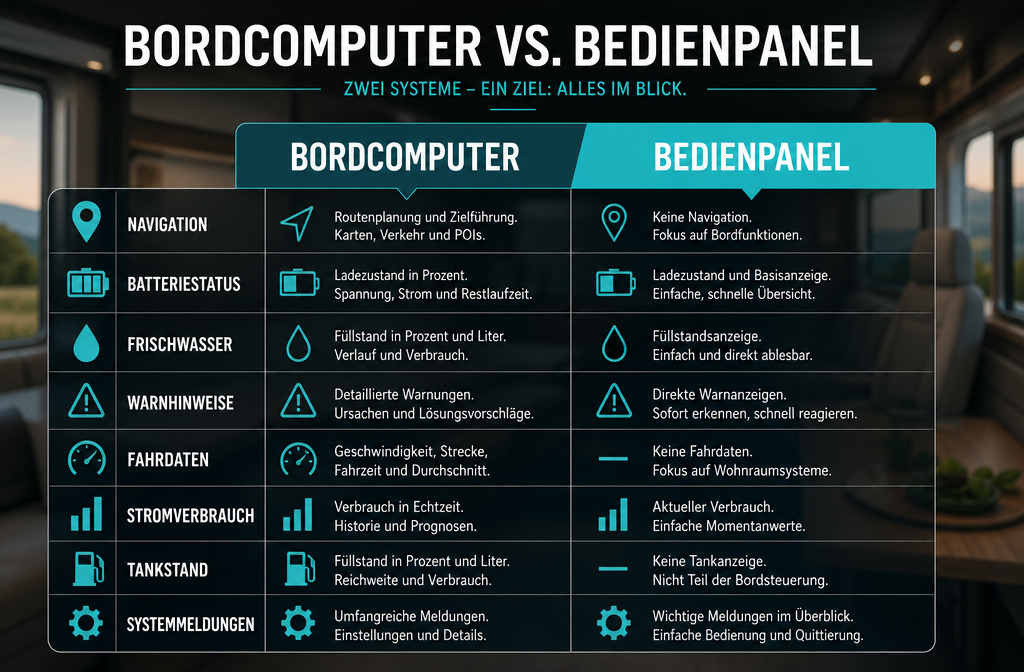
The trip computer and control panel are two separate systems with different tasks. The trip computer belongs to the vehicle (engine, transmission, chassis), the control panel belongs to the living area.
In short:
| Characteristic | On-board computer | Control panel |
|---|---|---|
| Responsible for | Vehicle (engine, ABS, ESP) | Living area (battery, water, heating) |
| Position | Dashboard | Living space or cockpit proximity |
| Manufacturer | Vehicle manufacturers (Mercedes, Fiat) | Body manufacturer (CBE, Schaudt, Truma) |
| Diagnosable? | Yes, via OBD | Restricted |
A common beginner's mistake: Seeing a warning light on the living area panel, people take their vehicle to the workshop and are surprised when the mechanic finds nothing. The reason: Workshops read the vehicle's on-board computer, not the living area panel.
What errors can I fix myself on the control panel?
Many problems on the control panel can be solved yourself without specialist knowledge. The most common causes are empty tanks, tripped fuses or incorrectly set threshold values.
Self-fixable problems:
- Fresh water tank empty: Turn off the water pump, fill the tank, turn the pump back on.
- Breaker tripped. Check the fuse box (often under the driver's seat or in the rear storage compartment), replace any tripped fuse.
- Battery indicator shows 0%. Check the main switch for the auxiliary battery, often accidentally switched off.
- Panel is not responding: Try a quick restart by turning the main switch off and on.
- Wastewater warning despite empty tank: Sensor dirty, rinse with clear water.
Do not repair yourself (specialist company recommended):
- Heating error codes (F codes for Truma)
- Defective voltage converters (inverters)
- Short circuits in the vehicle electrical system
Anyone who camps regularly should also have the Defects relevant to the German MOT (TÜV) from the sixth year onwards know, as electrical components play an important role.
How do I recognize a defective voltage converter on the panel?
A defective voltage converter (inverter or converter) is indicated on the control panel by specific symptoms: 230 V sockets do not supply power, even though shore power is connected, or the battery is not charged despite the charger being connected.
Typical signs on the panel:
- Shore power symbol is illuminated, but 230V appliances are not working.
- Battery voltage does not increase even after being connected for hours.
- Panel shows "Charging active", but voltage remains constantly low
- Unusual heat development on the panel or fuse box
First steps towards diagnosis:
- Check the shore power cable and socket at the pitch (connect a different device).
- Check the charger/inverter fuse.
- Voltage measurement on the battery with multimeter (12 V side)
- If everything is inconspicuous: consult a specialist company
Are there differences between operator panels from different manufacturers?
Yes, the differences between manufacturers are significant, both in appearance and in the depth of functionality. However, the basic functions (battery, water, heating) are present in all systems.
The most well-known systems at a glance:
| Manufacturer | System | Besonderheit |
|---|---|---|
| CBE (Italy) | PC200, PC210 | Widely used, modularly expandable |
| Schaudt (Germany) | EBL 99, EBL 101 | Robust construction, many vehicle brands |
| Truma | iNet Box | App control via smartphone |
| Dometic | MCC | Integrated climate control |
| Votronic | VAC | Focus on battery and solar monitoring |
Choose X if...
- CBE: You are looking for an affordable, widespread system with good spare parts availability.
- Truma iNet: You value smartphone integration and remote control.
- Votronic: Your focus is on precise battery monitoring and solar monitoring.
Costs for a new control panel in the RV
Depending on the manufacturer and scope of functions, a replacement control panel costs between €150 and over €800. In addition, there are installation costs, which can range from 1 to 4 hours of workshop time, depending on the effort involved.
Guideline prices (as of 2026, without guarantee):
- Simple panels (Battery and tank display only): €150–€250
- Mid-range systems (CBE PC200, Schaudt EBL): 250–450 €
- Premium Systems (Truma iNet, Dometic MCC): €450–800 and more
- Installation by a qualified technician: 80–150 € per hour (estimated, varies regionally)
When is a replacement worthwhile?
- Panel no longer responds to input.
- Display defective or unreadable
- Retrofitting desired (e.g. solar monitoring)
- Vehicle is being rebuilt or modernized
Who benefits from a complex operating panel?
A complex panel with advanced solar monitoring, app connectivity, and configurable alarms is particularly worthwhile for frequent campers, permanent campers, and anyone who travels self-sufficiently (without shore power).
Complex panel useful for:
- People who more than 30 nights per year spending time in the camper
- Camper with Solar power system and/or Lithium battery
- All those who self-sufficient on pitches without electricity stay overnight
- Technically interested users who want to analyze consumption data
Simple panel sufficient for:
- Occasional camper (a few weeks per year)
- Users who almost always with shore power camp
- Beginners who are just getting acquainted with the topic
Common Misunderstandings with RV Control Panels
The biggest misconception: Many campers believe that a full bar indicator for water means exactly 100%. In reality, tank sensors in motorhomes are often inaccurate, especially with dirt or limescale deposits.
Other common misconceptions:
- ❌ “The panel shows everything that's happening in the vehicle.” Wrong: It only shows the living area.
- ❌ "When the battery indicator shows 50%, I can still drive for a long time." Wrong: With lead-acid batteries, deep discharge is possible below 50%, which can permanently damage the battery.
- ❌ "Red warning light = vehicle broken." Often it's just an empty tank or a tripped fuse.
- ❌ "All panels work the same." Wrong: Operation, menu structure and symbols vary considerably depending on the manufacturer.
What functions do professionals like to have on the control panel?
Experienced campers and permanent campers especially appreciate features that provide deep insights into the energy balance and warn of problems early on.
Top functions for experienced users:
- Real-time voltage display (not just bars, but precise volt values)
- Ampere-hour meter (how much energy was drawn/charged)
- Configurable warning thresholds (own limit values for battery and tanks)
- App Control (Truma iNet, Dometic App) for remote access
- Solar monitoring (Feed-in in Watts, Daily yield)
- Historical consumption data (Daily and Weekly Overview)
Anyone wanting to rent a campervan and first get to know the control panel can do so via Campcruisers.com Book various motorhomes with different equipment levels and gain direct experience.
FAQ: Control Panel in the Camper
What is the difference between a leisure battery and a starter battery?
The auxiliary battery powers the living area (lights, pump, heating), the starter battery starts the engine. Both are displayed separately and should never be confused with each other.
Why does my panel show "Battery low" even though I just drove?
When driving, the alternator charges the starter battery, but not always the auxiliary battery sufficiently, especially on short trips. A split charge relay or B2B charger is necessary to charge the auxiliary battery effectively.
Can I install the control panel myself?
Simple panels can be installed with basic knowledge of 12V electrics. Complex systems with 230V integration should be installed by a specialist company.
What does "shore power" mean on the panel?
Shore power means that the vehicle is connected to an external 230V socket (campsite) via a cable. The panel indicates whether the connection is active and the voltage is correct.
Why is my fuel gauge jumping around?
Tank sensors in RVs react to movement and limescale deposits. This is normal and not a defect. Regularly flushing the tanks improves accuracy.
What to do when the panel is completely dark?
Check the main switch for the auxiliary battery, check the fuses and verify that the battery still has voltage (multimeter). If everything seems to be in order: consult a specialist workshop.
How often should I check the control panel?
At least in the morning and evening, especially the battery and water level indicators. When camping off-grid, also after switching on large consumers (heating, coffee machine).
Can I exchange an old panel for a more modern one?
Yes, in most cases an upgrade is possible. However, compatibility with existing cabling and sensors must be checked in advance.
Conclusion: Understanding the control panel in the camper is worth it.
The control panel in the camper isn't rocket science, but understanding the buttons and displays really well makes traveling much more relaxed. Green means good, red means action, and many supposed breakdowns can be resolved with a look at the fill level or the fuse.
Concrete next steps:
- Read the manual: Each panel has a manual, often also available as a PDF from the manufacturer. Reading it through once saves a lot of stress.
- Photographing Symbols: On your first camping trip, photograph and label the most important displays.
- Buying a multimeter: A simple multimeter (from around €15) enables you to take your own voltage measurements and is a useful addition to the panel.
- Check regularly: Keep an eye on battery and tank levels daily, especially when camping off-grid.
For those who don't yet own a camper and want to get to know the control panel in practice: On Campcruisers.com Motorhomes of various equipment classes can be Rent a campervan and try it out directly on your next adventure. Whether it's a Tuscany tour or a North Sea vacation, the first glance at the panel will no longer be a mystery after this guide. 🚐✨
For anyone interested in the glamping boom and the growing independence of modern campers, it's worth taking a look at Why camper independence is more important than ever today.
Meta Title: Campervan Control Panel: Buttons and Displays Explained
Meta Description: What do the symbols and warning lights on the camper control panel mean? Everything about batteries, tanks and errors – explained in an understandable way for camping beginners and professionals.
Tags: Camper Control Panel, Motorhome Control Panel, Motorhome Displays, Camper Battery Indicator, Motorhome Warning Lights, Camper Electrics, Camper On-Board Computer, Fresh Water Tank Indicator, Camper Rental, Motorhome Technology, Camping Beginner, Truma Panel


 English
  German
  Spanish
  Italian
  Polish
  Dutch
Dutch  French
  Danish